Soap Dispenser Sensor Not Working
If your soap dispenser sensor is not working, the unit may fail to detect your hand, dispense soap inconsistently, or stop responding completely. In most cases, sensor problems are caused by weak batteries, a dirty sensor window, blocked detection area, incorrect hand placement, moisture, or an internal electronic issue.
This troubleshooting guide helps you diagnose common touchless soap dispenser sensor issues and restore reliable automatic operation in commercial restrooms, offices, hotels, schools, healthcare facilities, restaurants, and other high-traffic environments.
Touchless Sensor Help
Automatic Soap Dispenser Repair
Battery & Detection Checks
Commercial Restroom Support
|
|
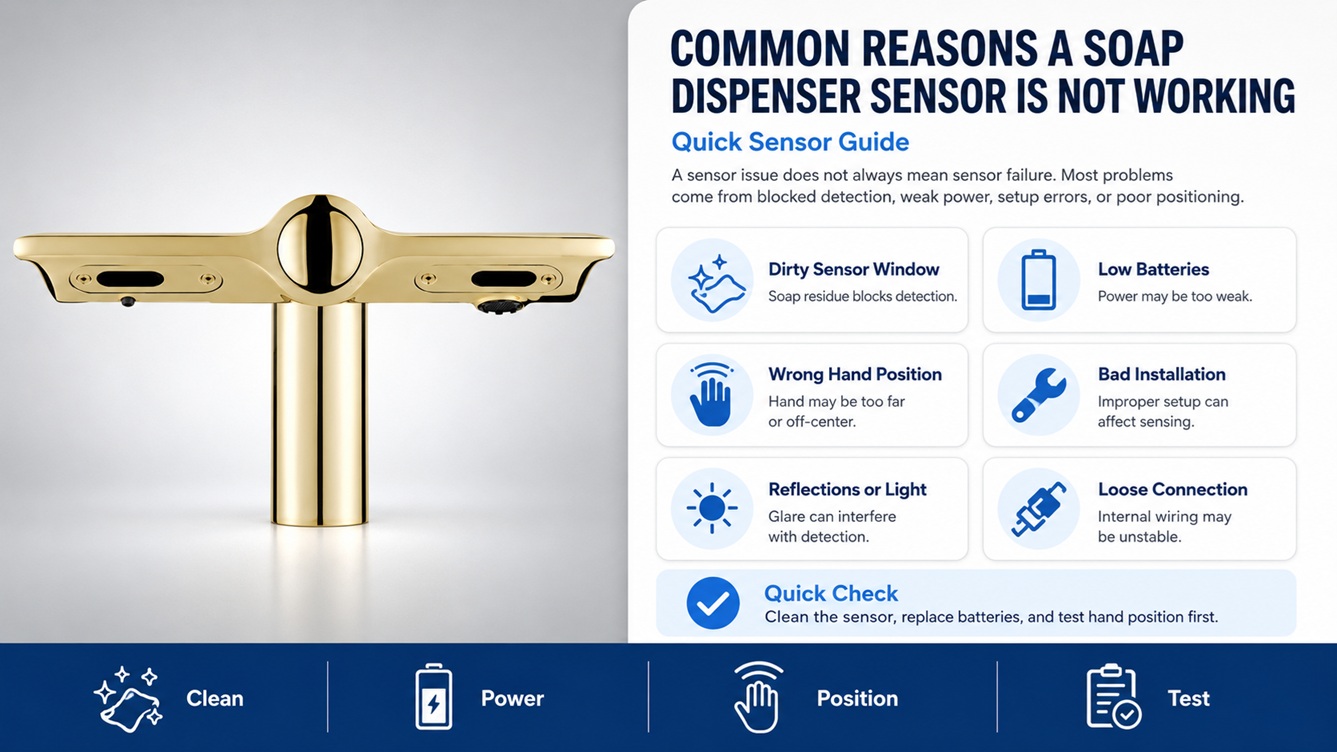
Common Reasons a Soap Dispenser Sensor Is Not Working
A soap dispenser sensor not working does not always mean the sensor has failed. Touchless dispensers rely on a clear detection area, steady battery power, correct installation, and a clean sensor window. When any of these conditions are interrupted, the dispenser may not activate properly.
Dirty Sensor Window
Soap residue, fingerprints, water spots, dust, or cleaning chemical buildup can block the sensor and prevent hand detection.
Weak or Dead Batteries
Low batteries can make the sensor respond slowly, activate only sometimes, or stop working completely.
Incorrect Hand Placement
If the hand is too far away, too low, too high, or outside the detection range, the dispenser may not activate.
Blocked Detection Area
Objects, wall reflections, sink edges, countertop items, or nearby surfaces may interfere with the sensor field.
Moisture Around Electronics
Water intrusion or condensation near the sensor housing can cause inconsistent response or complete sensor failure.
Internal Control Issue
If cleaning and battery replacement do not help, the sensor board, wiring, or control module may need service or replacement.
Quick Diagnosis: If the sensor light turns on but no soap comes out, the sensor may be working and the issue may be with the refill, nozzle, pump, or soap flow. If there is no light, sound, or response, start with batteries and sensor cleaning.
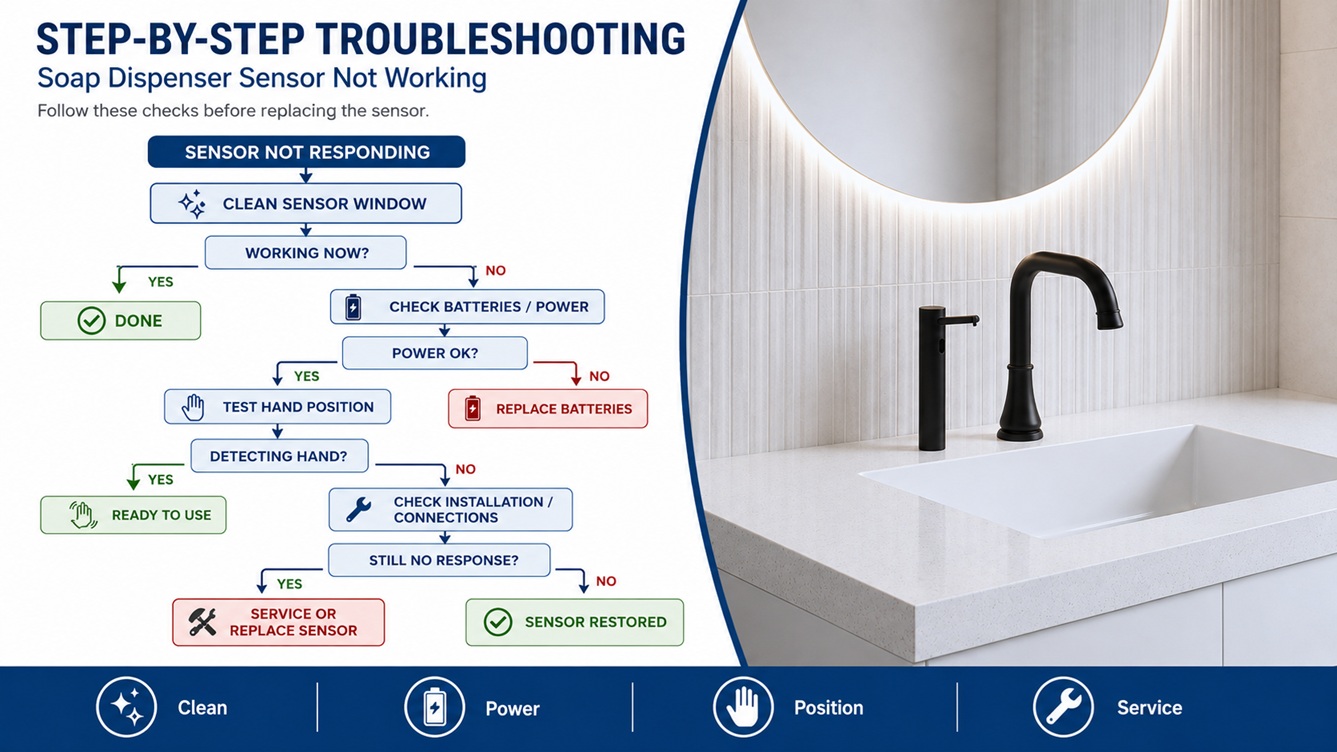
Step-by-Step Troubleshooting
Follow these steps when your soap dispenser sensor is not working. Begin with cleaning and power checks before assuming the sensor needs replacement.
-
Clean the sensor window.
Wipe the sensor area with a soft damp cloth. Remove soap residue, fingerprints, dust, water spots, and cleaning-product film. Do not use abrasive pads or harsh chemicals that may scratch or cloud the sensor lens.
-
Replace the batteries.
Install fresh batteries of the recommended type. Make sure they are facing the correct direction. Weak batteries can cause the touchless soap dispenser sensor to work intermittently or fail to activate the pump.
-
Check the battery contacts.
Look for corrosion, moisture, or loose battery springs. If the contacts are dirty or corroded, clean them carefully and allow the battery compartment to dry fully before testing the dispenser again.
-
Test hand placement.
Place your hand directly under the sensor at different distances. Some automatic soap dispenser sensors have a narrow detection range and may not activate if the hand is too far from the lens.
-
Remove objects near the sensor.
Check for items placed too close to the dispenser, including soap bottles, paper towel holders, backsplash edges, reflective surfaces, or countertop accessories. These can interfere with the sensor field.
-
Check the dispenser cover.
Make sure the cover is closed securely. Some dispensers will not operate if the cover, refill door, or internal housing is not properly locked.
-
Reset the dispenser.
Turn the unit off if it has a power switch. Remove the batteries for 30 to 60 seconds, reinstall fresh batteries, close the cover, and test the sensor again.
-
Listen for the motor.
If the sensor detects your hand and the motor runs, the sensor is likely working. If no soap dispenses, check the nozzle, refill, pump, and soap viscosity.
-
Inspect for moisture or damage.
If the sensor area has been exposed to water, leaks, or heavy cleaning spray, allow the unit to dry completely. Persistent failure may indicate internal sensor or circuit damage.
How to Reset a Touchless Soap Dispenser Sensor
Resetting the sensor can help resolve temporary electronic glitches, battery interruptions, or inconsistent detection. The exact reset method may vary by model, but many automatic soap dispensers can be reset using the following process.
- Turn the dispenser off if it includes a power button.
- Remove the batteries from the battery compartment.
- Wait 30 to 60 seconds before reinstalling batteries.
- Check the sensor window and clean it gently.
- Install fresh batteries in the correct direction.
- Close the cover or housing securely.
- Place your hand under the sensor and test activation.
- Repeat the test at a few distances to confirm the detection range.
If the soap dispenser sensor still does not work after a reset, check for moisture, corrosion, loose wiring, or internal electronic failure. In high-traffic commercial installations, replacing a faulty unit may be more efficient than repeated service calls.
Important: Do not spray water or cleaning solution directly into the sensor area. Apply cleaner to a cloth first, then wipe the surface gently.
Sensor Works But Soap Does Not Dispense
If the sensor light turns on or the motor activates, but no soap comes out, the sensor may not be the main problem. In this situation, the dispenser is detecting your hand, but the soap is not moving through the pump system.
Check These Soap Flow Issues:
- The refill bottle or cartridge may be empty.
- The soap cartridge may not be seated correctly.
- The nozzle may be blocked with dried soap.
- The pump line may contain air and need priming.
- The soap may be too thick for the dispenser.
- The wrong refill type may be installed.
When the sensor responds but the dispenser does not release soap, use a soap-flow troubleshooting approach. Clean the nozzle, check the refill, prime the pump, and confirm that the soap type matches the dispenser design.
When to Replace Batteries, Sensor, or Dispenser
Sensor problems can sometimes be fixed with simple maintenance. However, if your soap dispenser sensor is not working after cleaning, resetting, and battery replacement, it may be time to replace a component or the full dispenser.
Replace the Batteries When:
- The dispenser responds only sometimes.
- The sensor light is dim, blinking, or inconsistent.
- The motor sounds weak or slow.
- The dispenser stops working shortly after reset.
- The battery contacts show corrosion or poor connection.
Inspect the Sensor When:
- The dispenser does not detect hands after cleaning.
- The sensor window appears cracked, cloudy, or scratched.
- The unit activates randomly without a hand present.
- The dispenser only works at one unusual angle or distance.
- The sensor area has been exposed to water damage.
Replace the Dispenser When:
- The sensor remains unresponsive with fresh batteries.
- The unit has internal corrosion or visible electronic damage.
- The dispenser activates randomly and cannot be stabilized.
- The sensor, pump, and refill system repeatedly fail in a commercial restroom.
- The dispenser is no longer reliable for high-traffic use.
Recommended Automatic Soap Dispenser Solutions
If your touchless soap dispenser sensor is not working reliably, upgrading to a dependable automatic soap dispenser can help improve restroom hygiene and reduce maintenance issues. Reliable sensor performance is especially important in public restrooms, commercial buildings, hospitality properties, healthcare settings, and office environments.
For commercial projects, choose automatic soap dispensers with durable construction, responsive sensor technology, suitable refill capacity, compatible soap options, and a finish that coordinates with nearby touchless faucets and restroom fixtures.
Related Troubleshooting Guides
Sensor issues can overlap with battery, refill, and soap-flow problems. Use these related troubleshooting guides to narrow down the exact cause.
FAQs
Why is my soap dispenser sensor not working?
The most common causes are a dirty sensor window, weak batteries, incorrect hand placement, blocked detection area, moisture near the electronics, or an internal sensor issue.
How do I clean a touchless soap dispenser sensor?
Use a soft damp cloth to gently wipe the sensor window. Avoid abrasive pads, harsh cleaners, or spraying liquid directly onto the sensor, as this can damage the lens or electronics.
Can low batteries affect the soap dispenser sensor?
Yes. Low batteries can cause the sensor to respond slowly, work only sometimes, or stop activating the pump. Replacing the batteries is one of the first steps when troubleshooting sensor problems.
Why does my dispenser activate randomly?
Random activation can happen when an object, reflection, sink edge, or nearby surface interferes with the sensor field. It may also be caused by moisture, sensor damage, or internal electronic problems.
Why does the sensor light turn on but no soap comes out?
If the sensor light turns on, the sensor may be working correctly. The issue may be an empty refill, clogged nozzle, thick soap, air in the pump line, or a loose cartridge connection.
When should I replace a touchless soap dispenser?
Consider replacement if the sensor does not respond after cleaning, battery replacement, reset, and inspection. In commercial restrooms, replacement may be best when sensor performance becomes unreliable.
|
|
|